Showing posts with label Play. Show all posts

Thursday, 2 November 2017

Play 2.6.x: Joda DateTime Format not working

In Play Framework 2.6.x, Joda DateTime Format (that is READs and WRITEs) is not working. When we use something like below:

(JsPath \ "joiningDate").read[LocalDate] 

We will see the following error message:

No Json deserializer found for type org.joda.time.LocalDate. Try to implement an implicit Reads or Format for this type.

To fix that issue, we need to do the following two setps:

1. Add the following entry into your build.sbt file

libraryDependencies += "com.typesafe.play" % "play-json-joda_2.12" % "2.6.6"

Or

scalaVersion := "2.12.2"
libraryDependencies += "com.typesafe.play" %% "play-json-joda" % "2.6.6"

2. Add the following imports to your Model file
import play.api.libs.json.JodaWrites._
import play.api.libs.json.JodaReads._

Description:
They have separated the Joda Date and Time library into a separate module:
play-json-joda

That's it.

Thank you for reading my tutorials.

Wednesday, 17 May 2017

Activator will be EOL-ed on May 24, 2017.

Activator will be EOL-ed on May 24, 2017.

We’re making it easier and simpler for developers to get started with Lightbend technologies.


This unfortunately means that future releases of Play, Akka and Scala will no longer include Activator support, and Lightbend’s Activator server will be decommissioned by the end of 2017. Instead of supporting Activator to create and set up development projects, we'll be supporting standard Giter8 templates for sbt users and Maven archetypes for Maven users.

So going forward,
To create new Lightbend projects
Instead of using the Activator command, make sure you have sbt 0.13.13 (or higher), and use the “sbt new” command, providing the name of the template.

For example, “$ sbt new akka/hello-akka.g8”. You can find a list of templates here.

Also, as a convenience, the Lightbend Project Starter allows you to quickly create a variety of example projects that you just unzip and run.

To create new templates

If you want to create new templates, you can now do that in Giter8.

To migrate templates from Activator to Giter8
If you created Activator templates in the past, please consider migrating them to Giter8 with this simple process.

Thank you!

Tuesday, 4 April 2017

Play Framework 2.5.13 New Features

Play 2.5.13 “Streamy”

  • #7040: Add @helper.repeatWithIndex(…) helper
  • #7033: Fix XHTML mime type
  • #7013: Add note to Migration25 about Lucidchart blog
  • #6966: Fix documentation code NPE
  • #6954: Update Typesafe Config to 1.3.1
  • #6934: Update docs with more information about sbt new
  • #6948: Remove images that related to activator
  • #6944: Add Scalate as a library for Play support documentation
  • #6933: Add immutable header to aggressiveCacheControl
  • #6925: Upgrade sbt-native-packager to latest stable version
  • #6874: Update Deploying.md
  • #6908: Remove unnecessary println call
  • #6906: added play-guard (Scala) to module directory
  • #6850: Reference to play-redis module in Module directory in the documentation

Sunday, 14 August 2016

Play Framework: Setup Activator and Develop Simple Play/Scala Application

Introduction

I'm going to deliver a series of posts on How to develop Highly Scalable and Highly responsive and Highly concurrent Web Applications using Scala, Play and Akka Framework basics.

In this post, I'm going to discuss about the following important things about Play Framework.
  • How to Download and Install Activator
  • How to Develop a Simple Play/Scala App with Activator
  • How to Run Play/Scala App with Activator
I will walk through this application code in depth in my coming posts. Please read my next post to understand the application code.

NOTE:- Recently, Typesafe company has changed it's name to Lightbend.

We can develop Play/Scala applications using Libghtbend Activator very easily. 


Download Lightbend Activator:


  • Please access the Play Framework website
       https://www.playframework.com/download
  • Click on download link as shown below
  

  • Lightbend Activator software looks like as shown below      

Install and Setup Lightbend Activator:

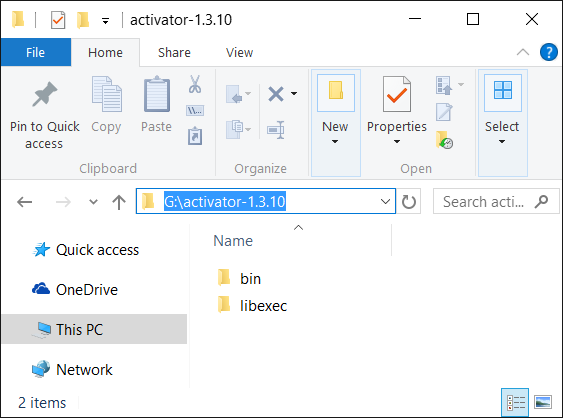
  • Unzip to required location (have Changed the folder name, not mandatory)
  • Set Activator BIN path to System Variable PATH
       PATH=G:\activator-1.3.10\bin


We have installed and setup Activator successfully. It's time to start developing Play/Scala applications.


Develop a Simple Play/Scala App With Activator:

Please use the following steps to develop a Simple Play/Scala applications with Lightbend activator.

  • Open CMD prompt at your required location as shown below:
  • Execute "activator new" command as shown below
"activator new" command is used to create base templates of different kinds of applications as shown blow.


Here Activator command list out 6 different kinds of available templates to create Play, Scala and Akka based applications.

  • Please select option 6 from this list as shown below
   
  • Now it ask for application name. Please enter name of your Sample Play/Scala application as shown below
         Here I have given my application name as:  SamplePlayScalaApp
  • Press Enter key
  

It creates an application at current directory and also display some useful commands at the end as shown in the above diagram.

So, our application path is: G:\PlayFramework\SamplePlayScalaApp

We can see this application folder structure as shown below:

I will write another post to discuss about the Play Projects folder structure in detail.

It's time to run and access this sample Play/Scala application.

Run Simple Play/Scala App With Activator:


  • Open CMD prompt at our application root folder as shown below
  • Run "activator run" command to start the application as shown below
       

By observing the log at console, we can see that application is started successfully at 9000 default port number

NOTE:- If you run this application for first, it will definitely takes a lot of time in conecting to the internet and download all required dependencies.
  • Access our application and see the output on Browser as shown below

That's it.

I will walk through this application code in depth in my coming post.


Thank you for reading my tutorials.

Please drop me a comment if you like my tutorials or have any issues/suggestions.

Happy Play Framework Learning!

Tuesday, 8 March 2016

Play 2.5 Framework: Why Akka Streams? Why not iteratees?

New streaming API based on Akka Streams

The main theme of Play 2.5 has been moving from Play’s iteratee-based asynchronous IO API to Akka Streams.
At its heart, any time you communicate over the network, or write/read some data to the filesystem, some streaming is involved. In many cases, this streaming is done at a low level, and the framework exposes the materialized values to your application as in-memory messages. This is the case for many Play actions, a body parser converts the request body stream into an object such as a parsed JSON object, which the application consumes, and the returned result body is a JSON object that Play then turns back into a stream.
Traditionally, on the JVM, streaming is done using the blocking  InputStream  and OutputStream  APIs. These APIs require a dedicated thread to use them - when reading, that thread must block and wait for data, when writing, that thread must block and wait for the data to be flushed. An asynchronous framework, such as Play, offers many advantages because it limits the resources it requires by not using blocking APIs such as these. Instead, for streaming, an asynchronous API needs to be used, where the framework is notified that there’s data to read or that data has been written, rather than having to have a thread block and wait for it.
Prior to Play 2.5, Play used Iteratees as this asynchronous streaming mechanism, but now it uses Akka Streams.

Why not iteratees?

Iteratees are a functional approach to handling asynchronous streaming. They are incredibly powerful, while also offering an incredibly small API surface area - the Iteratee API consists of one method, fold, the rest is just helpers built on top of this method. Iteratees also provide a very high degree of safety, as long as your code compiles, it’s very unlikely that you would have any bugs related to the implementation of an iteratee itself, such as concurrency or error handling, most bugs would be in the “business” logic of the iteratee.
While this safety and simplicity is great, the consequence of it was that it has a very steep learning curve. Programming using iteratees requires a shift in thinking from traditional IO handling, and many developers find that the investment required to make this shift is too high for their IO needs. Another disadvantage of iteratees is that they are practically unimplementable in Java, due to their reliance on many high level functional programming features.

Why Akka Streams

Akka streams provides a good balance between safety, simplicity and familiarity. Akka streams intentionally constrains you in what you can do so that you can only do things correctly, but not as much as iteratees do. Conceptually they are much more familiar to most developers, offering both functional and imperative ways of working with them. Akka streams also has a first class Java API, making it simple to implement any streaming requirements in Java that are needed.

Where are Akka streams used?

The places where you will come across Akka streams in your Play applications include:
  • Filters
  • Streaming response bodies
  • Request body parsers
  • WebSockets
  • Streaming WS client responses

Reactive Streams

Reactive Streams is a new specification for asynchronous streaming, which is scheduled for inclusion in JDK9, and available as a standalone library for JDK6 and above. In general, it is not an end-user library, rather it is an SPI that streaming libraries can implement in order to integrate with each other. Both Akka streams and iteratees provide a reactive streams SPI implementation. This means, existing iteratees code can easily be used with Play’s new Akka streams support. It also means any other reactive streams implementations can be used in Play.

The future of iteratees

Iteratees still have some use cases where they shine. At current, there is no plan to deprecate or remove them from Play, though they may be moved to a standalone library. Since iteratees provide a reactive streams implementation, they will always be usable in Play.
Please drop me a comment if you like my posts or have any suggestions or comments
Thank you.

Monday, 7 March 2016

Play Framework 2.5.0 New Features

In this post, we are going to discuss about Play Framework new version 2.5.0 New features. 

Introduction

TypeSafe (LightBend) team has released Play Framework 2.5.0 version on March 04th, 2016 with lot of new features.


Here I have listed out all new Features of Play Framework 2.5. We will discus each new feature in-detail with some useful examples in my coming posts.


Play Framework 2.5.0 New Features:

1. New Stream API

Current Play Framework versions are using Play’s iteratee-based asynchronous IO API. Play 2.5.0 is going to move from Play’s iteratee-based asynchronous IO API to Akka streams.

2. WebSocket Frames Improvements


The Play Framework v.2.5 WebSocket API gives us more direct control over WebSocket frames. 

We can send and receive binary, text, ping, pong and close frames. If we don’t need this facility, Play Framework will automatically convert our request/response JSON or XML data into the right kind of frame.

3. Java API Updated to use JAVA SE 8

We can use SAM(Functional Interfaces) like Consumer,Runnable,Predicate etc and also Optional.

4. Supports other Logging Frameworks

Current versions of Play Framework supports only built-in Logback logging framework. Now, Play Framework 2.5 onwards, it supports other logging frameworks too like it also supports SL4FJ logging framework.


5. Performance Improvements

6. WS Improvements

7. ScalaTest Improvments

Play Framework 2.5 supports Scalatest 3.0 version.

8. Netty Server Improvements

Play Framework 2.5 supports Netty 4.0 server as Native Socket transport. 


Here I have listed out all new Features of Play Framework 2.5. We will discus each new feature in-detail with some useful examples in my coming posts.

Please drop me a comment if you like my post or have any suggestions or issues.

Thank you.


Thursday, 25 February 2016

Play Framework 2.4.x Features

Introduction:


Now-a-days, many projects are using Play Framework with Scala to develop their web applications because this Technologies Stack(Play/Scala) gives us more benefits than Spring/Java Stack like developing Highly Scalable, Highly Performance, Highly Concurrent and Parallel and Reactive Applications very easily.

While writing this post, the latest version of Play Framework is 2.4.6.

In this post, we are going to discuss the Play Framework 2.4.x New Features. Please read my upcoming posts to learn these concepts in-depth with simple to advanced examples.


Play Framework 2.4.x New Features:

  • DI (Dependency Injection):- Now, Play Framework 2.4.x supports DI (Dependency Injection)
  • Java SE 8:- Now, Play Framework 2.4.x supports Java SE 8 features.
  • Improved Testing:- Because of DI feature, Testing Play Framework 2.4.x application is very easy.
  • Embedded Play Server:- From Play Framework 2.4.x on-wards, we can use Play Framework Embedded Server.
         It improves the development productivity.
  • Maven/SBT Project Directory Layout:- Before Play Framework 2.4.x, we should follow some "Default Play Application Project Structure" for both Maven or SBT build tools. 
     From Play Framework 2.4.x on-wards, we can choose either of two options:
  1. Default Play Project layout 
  2. Maven/SBT Build Tools Project Layout.
  • Anorm and Ebean Improvements:- Play Framework 2.4.x has improved it's Database API for Anorm and Ebean.
  • Supports Akka's Reactive Streams
  • Improved WS feature.

Please read my upcoming posts to learn these concepts in-depth with simple to advanced examples.

Please drop me a comment if you like this post or have any issues or suggestions.

Thank you for reading my post.

Tuesday, 23 February 2016

Typesafe Changes Name to Lightbend


Typesafe Changes Name to Lightbend.  Typesafe company was founded by Martin Odersky. He is the father of Scala Language.

The Typesafe Reactive Platform:

Typesafte company supports the following product under "The TypeSafe Reactive Platform":
  • Scala Language
  • Play Framework
  • Akka Framework
  • SBT
  • Slick
  • Scala IDE for Eclipse
  • Activator

The Lightbend Reactive Platform:

In addition to above products, they are going to support the following products under new Platform:
  • Apache Spark
  • Microservices
  • ConductR

Slick is database query language useful for Play/Scala/Akka based applications.
SBT stands for Simple Build Tool or Scala Build Tool. It is the default build tool for Play/Scala/Akka based applications.

Activator is a Typesafe command or tool to create, develop, compile and test Play/Scala/Akka based applications.

The following image is copied from www.lightbend.com website.


Existing Website URL: www.typesafe.com

New Website URL: www.lightbend.com

Even, they have changed Reactive Platform name from "The Typesafe Reactive Platform" to "The Lightbend Reactive Platform".

I will try to provide information about new platform in my coming posts.

Thank you for reading my tutorials.

Please drop a comment with your suggestions or issues.